<?xml version="1.0" encoding="utf-8"?><feed xmlns="http://www.w3.org/2005/Atom" ><generator uri="https://jekyllrb.com/" version="3.10.0">Jekyll</generator><link href="https://benword.com/feed.xml" rel="self" type="application/atom+xml" /><link href="https://benword.com/" rel="alternate" type="text/html" /><updated>2026-06-08T23:15:38+00:00</updated><id>https://benword.com/feed.xml</id><title type="html">Ben Word</title><subtitle>Ben Word is a product engineer and the creator of roots.io</subtitle><entry><title type="html">Discourse to Markdown: Serve Your Forum to AI Agents</title><link href="https://benword.com/discourse-to-markdown-serve-your-forum-to-ai-agents" rel="alternate" type="text/html" title="Discourse to Markdown: Serve Your Forum to AI Agents" /><published>2026-04-21T00:00:00+00:00</published><updated>2026-04-21T00:00:00+00:00</updated><id>https://benword.com/discourse-to-markdown-serve-your-forum-to-ai-agents</id><content type="html" xml:base="https://benword.com/discourse-to-markdown-serve-your-forum-to-ai-agents"><![CDATA[<p>I built <a href="https://github.com/roots/discourse-to-markdown">roots/discourse-to-markdown</a>, a Discourse plugin that does <a href="/serving-markdown-to-ai-agents-via-accept-headers">content negotiation</a> on every forum route. Send <code class="language-plaintext highlighter-rouge">Accept: text/markdown</code> or append <code class="language-plaintext highlighter-rouge">.md</code> to any URL and you get Markdown back instead of HTML.</p>

<h2 id="what-it-does">What it does</h2>

<p>Every route a reader hits has a Markdown equivalent:</p>

<table>
  <thead>
    <tr>
      <th>Route</th>
      <th>HTML</th>
      <th>Markdown</th>
    </tr>
  </thead>
  <tbody>
    <tr>
      <td>Topic</td>
      <td><code class="language-plaintext highlighter-rouge">/t/:slug/:id</code></td>
      <td><code class="language-plaintext highlighter-rouge">/t/:slug/:id.md</code></td>
    </tr>
    <tr>
      <td>Single post</td>
      <td><code class="language-plaintext highlighter-rouge">/t/:slug/:id/:post_number</code></td>
      <td><code class="language-plaintext highlighter-rouge">/t/:slug/:id/:post_number.md</code></td>
    </tr>
    <tr>
      <td>Category</td>
      <td><code class="language-plaintext highlighter-rouge">/c/:slug/:id</code></td>
      <td><code class="language-plaintext highlighter-rouge">/c/:slug/:id.md</code></td>
    </tr>
    <tr>
      <td>Tag</td>
      <td><code class="language-plaintext highlighter-rouge">/tag/:tag</code></td>
      <td><code class="language-plaintext highlighter-rouge">/tag/:tag.md</code></td>
    </tr>
    <tr>
      <td>Latest</td>
      <td><code class="language-plaintext highlighter-rouge">/latest</code></td>
      <td><code class="language-plaintext highlighter-rouge">/latest.md</code></td>
    </tr>
    <tr>
      <td>Top</td>
      <td><code class="language-plaintext highlighter-rouge">/top</code></td>
      <td><code class="language-plaintext highlighter-rouge">/top.md</code></td>
    </tr>
    <tr>
      <td>Hot</td>
      <td><code class="language-plaintext highlighter-rouge">/hot</code></td>
      <td><code class="language-plaintext highlighter-rouge">/hot.md</code></td>
    </tr>
    <tr>
      <td>User activity</td>
      <td><code class="language-plaintext highlighter-rouge">/u/:username/activity</code></td>
      <td><code class="language-plaintext highlighter-rouge">/u/:username/activity.md</code></td>
    </tr>
  </tbody>
</table>

<p>Two ways to ask for it:</p>

<div class="language-bash highlighter-rouge"><div class="highlight"><pre class="highlight"><code><span class="c"># Accept header — for programmatic clients</span>
curl <span class="nt">-H</span> <span class="s2">"Accept: text/markdown"</span> https://discourse.roots.io/t/welcome/5

<span class="c"># .md URL suffix — shareable, paste-into-chat friendly</span>
curl https://discourse.roots.io/t/welcome/5.md
</code></pre></div></div>

<h2 id="content-negotiation-gotchas">Content negotiation gotchas</h2>

<p>Rails’ <code class="language-plaintext highlighter-rouge">Accept</code> handling doesn’t rank <code class="language-plaintext highlighter-rouge">text/markdown</code> above <code class="language-plaintext highlighter-rouge">*/*</code>, so <code class="language-plaintext highlighter-rouge">Accept: text/markdown, */*</code> gets you HTML. The plugin ships its own parser that ranks by specificity, the way <a href="https://www.rfc-editor.org/rfc/rfc9110#name-proactive-negotiation">RFC 9110</a> says it should.</p>

<p>It also sets <code class="language-plaintext highlighter-rouge">Vary: Accept</code> on every response. Without it, a CDN can cache the HTML for a given URL and serve it to an agent asking for Markdown, or vice versa.</p>

<h2 id="cooked-not-raw">Cooked, not raw</h2>

<p>Discourse stores two versions of every post: <code class="language-plaintext highlighter-rouge">raw</code> (the authoring syntax, with <code class="language-plaintext highlighter-rouge">[quote=…]</code> blocks and <code class="language-plaintext highlighter-rouge">:smile:</code> shortcodes) and <code class="language-plaintext highlighter-rouge">cooked</code> (the rendered HTML, with oneboxes expanded, mentions linked, and quotes attributed). The plugin converts <code class="language-plaintext highlighter-rouge">cooked</code> to Markdown so the output matches what readers actually see.</p>

<p>Discourse-specific constructs are rewritten before conversion:</p>

<ul>
  <li><code class="language-plaintext highlighter-rouge">&lt;aside class="quote"&gt;</code> → blockquote with <code class="language-plaintext highlighter-rouge">&gt; [@user](post-url):</code> attribution</li>
  <li><code class="language-plaintext highlighter-rouge">&lt;aside class="onebox"&gt;</code> → blockquote with title, URL, and excerpt</li>
  <li><code class="language-plaintext highlighter-rouge">&lt;details&gt;&lt;summary&gt;</code> → blockquote with bolded summary + body</li>
  <li><code class="language-plaintext highlighter-rouge">&lt;a class="mention"&gt;@user&lt;/a&gt;</code> → <code class="language-plaintext highlighter-rouge">@user</code> literal</li>
  <li><code class="language-plaintext highlighter-rouge">&lt;div class="lightbox-wrapper"&gt;</code> → image with the full-size URL</li>
</ul>

<h2 id="install">Install</h2>

<p>Add the plugin to your <code class="language-plaintext highlighter-rouge">app.yml</code>:</p>

<div class="language-yaml highlighter-rouge"><div class="highlight"><pre class="highlight"><code><span class="na">hooks</span><span class="pi">:</span>
  <span class="na">after_code</span><span class="pi">:</span>
    <span class="pi">-</span> <span class="na">exec</span><span class="pi">:</span>
        <span class="na">cd</span><span class="pi">:</span> <span class="s">$home/plugins</span>
        <span class="na">cmd</span><span class="pi">:</span>
          <span class="pi">-</span> <span class="s">git clone https://github.com/roots/discourse-to-markdown.git</span>
</code></pre></div></div>

<p>Then rebuild:</p>

<div class="language-bash highlighter-rouge"><div class="highlight"><pre class="highlight"><code><span class="nb">cd</span> /var/discourse
./launcher rebuild app
</code></pre></div></div>

<p>Flip <code class="language-plaintext highlighter-rouge">discourse_to_markdown_enabled</code> on in Admin → Settings → Plugins and every route above starts negotiating on <code class="language-plaintext highlighter-rouge">Accept: text/markdown</code> (and exposes a <code class="language-plaintext highlighter-rouge">.md</code> suffix as a fallback).</p>

<hr />

<p>More context at <a href="https://acceptmarkdown.com/">acceptmarkdown.com</a>, including a pass/fail readiness check for your own site. If you’re on WordPress instead of Discourse, <a href="https://github.com/roots/post-content-to-markdown">post-content-to-markdown</a> does the same job there.</p>]]></content><author><name></name></author><summary type="html"><![CDATA[A Discourse plugin that serves topics, categories, tags, and list pages as Markdown via Accept header or .md URL suffix — content negotiation for LLMs.]]></summary><media:thumbnail xmlns:media="http://search.yahoo.com/mrss/" url="https://benword.com/img/social-discourse-to-markdown-serve-your-forum-to-ai-agents.png" /><media:content medium="image" url="https://benword.com/img/social-discourse-to-markdown-serve-your-forum-to-ai-agents.png" xmlns:media="http://search.yahoo.com/mrss/" /></entry><entry><title type="html">The Free Data Sitting in Common Crawl</title><link href="https://benword.com/the-free-data-sitting-in-common-crawl" rel="alternate" type="text/html" title="The Free Data Sitting in Common Crawl" /><published>2026-04-20T00:00:00+00:00</published><updated>2026-04-20T00:00:00+00:00</updated><id>https://benword.com/the-free-data-sitting-in-common-crawl</id><content type="html" xml:base="https://benword.com/the-free-data-sitting-in-common-crawl"><![CDATA[<p><a href="https://commoncrawl.org/">Common Crawl</a> crawls ~3 billion pages every few months and publishes all of it for free: pages, link graph, and ranks. A lot of paid SaaS is a nicer UI over data you could pull yourself. If you wanted to, nothing stops you from building the tool you’re paying for.</p>

<ul>
  <li><strong>Backlink tools</strong> like Ahrefs, Semrush, and Moz charge hundreds a month for who-links-to-whom data that’s in the domain edge file.</li>
  <li><strong>Domain authority scores</strong> are a pagerank-ish function over that edge list. CC ships harmonic centrality and pagerank in its ranks file.</li>
  <li><strong>Historical web archives</strong> are a paid product, but CC has ~10 years of releases sitting in S3.</li>
  <li><strong>Anchor text, nofollow, and first-seen dates</strong> live in the raw HTML, which CC publishes as WARCs.</li>
</ul>

<p>All you need is a shell and <a href="https://duckdb.org/">DuckDB</a>.</p>

<h2 id="a-barebones-example-backlinks">A barebones example: backlinks</h2>

<p><a href="https://gist.github.com/retlehs/cf0ac6c74476e766fba2f14076fff501">Here’s a gist</a> that pulls backlinks for any domain. Run it like this:</p>

<div class="language-bash highlighter-rouge"><div class="highlight"><pre class="highlight"><code>./backlinks.sh roots.io
</code></pre></div></div>

<p>And you get:</p>

<div class="language-plaintext highlighter-rouge"><div class="highlight"><pre class="highlight"><code>┌────────────────────┬───────────┐
│   linking_domain   │ num_hosts │
├────────────────────┼───────────┤
│ github.io          │    284009 │
│ substack.com       │    199844 │
│ cloudfront.net     │     89247 │
│ godaddy.com        │     60673 │
│ google.com         │     41269 │
│ ...                │       ... │
└────────────────────┴───────────┘
</code></pre></div></div>

<h2 id="what-common-crawl-publishes">What Common Crawl publishes</h2>

<p>Every few months, Common Crawl releases a <a href="https://commoncrawl.org/web-graphs">hyperlink web graph</a> derived from its crawl. Two files do the heavy lifting:</p>

<ul>
  <li><strong>Domain vertices</strong>: every domain it has seen, with a stable ID and host count.</li>
  <li><strong>Domain edges</strong>: every <code class="language-plaintext highlighter-rouge">(from_domain → to_domain)</code> link, as ID pairs.</li>
</ul>

<p>Domains are stored reverse-labeled (<code class="language-plaintext highlighter-rouge">io.roots</code> instead of <code class="language-plaintext highlighter-rouge">roots.io</code>) so they sort hierarchically. The script handles the flip for you.</p>

<p>The latest release (<code class="language-plaintext highlighter-rouge">cc-main-2026-jan-feb-mar</code>) is around 16 GB of gzipped edges. DuckDB scans the gzip directly, so there’s no extract step and no database to load.</p>

<h2 id="how-the-script-works">How the script works</h2>

<p>The query does three things:</p>

<ol>
  <li>Parse the vertex file, find the ID of the target domain.</li>
  <li>Scan the edge file for rows whose <code class="language-plaintext highlighter-rouge">to_id</code> matches that ID.</li>
  <li>Join back to vertices to get the human-readable <code class="language-plaintext highlighter-rouge">from</code> domains, sorted by host count.</li>
</ol>

<p>First run downloads the two files to <code class="language-plaintext highlighter-rouge">~/.cache/cc-backlinks/</code> and then scans the edges, which takes a few minutes. Subsequent runs against a different domain reuse the cache but still scan, so the time is about the same.</p>

<h2 id="more-than-just-counts">More than just counts</h2>

<p>The domain graph is one slice of what CC publishes.</p>

<ul>
  <li><strong>Domain ranks.</strong> Same release, separate file, with harmonic centrality and pagerank for every domain. That’s your “DR” score.</li>
  <li><strong>Host-level graph.</strong> Same structure, one level finer, with subdomains kept separate.</li>
  <li><strong>Historical releases.</strong> Graphs going back ~10 years, so you can chart a domain’s link growth over time.</li>
  <li><strong>Raw WARCs.</strong> The underlying HTML of every crawled page. Anchor text, nofollow attributes, exact linking URLs, and first-seen dates all live here.</li>
</ul>

<h2 id="caveats">Caveats</h2>

<p><strong>Common Crawl is static HTML only.</strong> Pages that render client-side are invisible to it, so domains with JS-heavy SPAs will under-count. It’s a real gap, though SPAs should really be serving usable HTML to bots anyway.</p>

<p><strong>You get counts, not enrichment.</strong> The domain graph tells you <em>who</em> links to you. It doesn’t tell you the anchor text, the nofollow status, the first-seen date, or the exact URL of the linking page. All of that lives in the raw <a href="https://commoncrawl.org/get-started">WARCs</a>. Free, but you have to parse them.</p>

<h2 id="go-build-something">Go build something</h2>

<p>Fair caveat: Ahrefs, Semrush, and Moz run their own crawlers. Their indexes are bigger than CC’s, fresher, and can render JS, so the numbers won’t line up. For a lot of use cases that difference doesn’t matter, and what you’re paying for is the index, the UI, and anchor-text extraction on top of data that’s mostly public. The gist is ~30 lines and is a decent starting point for working with CC data.</p>

<p><a href="https://commoncrawl.org/">Common Crawl</a> has been crawling the web and giving the results away since 2008 as a nonprofit. It’s one of the most useful open datasets on the internet and nobody had to pay for it. Huge thanks to the team for keeping it free and public.</p>]]></content><author><name></name></author><summary type="html"><![CDATA[Backlink tools, domain authority scores, historical web archives. All sold as subscriptions, all derivable from Common Crawl's free quarterly release.]]></summary><media:thumbnail xmlns:media="http://search.yahoo.com/mrss/" url="https://benword.com/img/social-the-free-data-sitting-in-common-crawl.png" /><media:content medium="image" url="https://benword.com/img/social-the-free-data-sitting-in-common-crawl.png" xmlns:media="http://search.yahoo.com/mrss/" /></entry><entry><title type="html">Serving Markdown to AI Agents via Accept Headers</title><link href="https://benword.com/serving-markdown-to-ai-agents-via-accept-headers" rel="alternate" type="text/html" title="Serving Markdown to AI Agents via Accept Headers" /><published>2026-04-18T00:00:00+00:00</published><updated>2026-04-18T00:00:00+00:00</updated><id>https://benword.com/serving-markdown-to-ai-agents-via-accept-headers</id><content type="html" xml:base="https://benword.com/serving-markdown-to-ai-agents-via-accept-headers"><![CDATA[<p><a href="https://x.com/bunjavascript/status/1839686605326569955">Bun announced</a> they started serving their documentation as raw Markdown to Claude Code instead of rendered HTML. The results were a 10× reduction in token usage.</p>

<p>It’s a great idea. I immediately wanted to implement it on our <a href="https://roots.io/">roots.io</a> docs.</p>

<p>The catch: doing it <em>correctly</em> — parsing the <code class="language-plaintext highlighter-rouge">Accept</code> header properly, ranking by q-values, setting <code class="language-plaintext highlighter-rouge">Vary: Accept</code> so CDNs don’t poison caches, returning <code class="language-plaintext highlighter-rouge">406 Not Acceptable</code> when appropriate — turned out to be more nuanced than a quick <code class="language-plaintext highlighter-rouge">str_contains</code> check. I ended up building a full reference site to cover it end-to-end.</p>

<h2 id="-acceptmarkdowncom">→ <a href="https://acceptmarkdown.com">acceptmarkdown.com</a></h2>

<p>It’s an evergreen reference for content negotiation with <code class="language-plaintext highlighter-rouge">Accept: text/markdown</code>:</p>

<ul>
  <li><strong><a href="https://acceptmarkdown.com/start">Quick start</a></strong> — the smallest working setup: one URL, two representations, a correct <code class="language-plaintext highlighter-rouge">Vary</code> header.</li>
  <li><strong><a href="https://acceptmarkdown.com/#readiness">How AI-ready is your URL?</a></strong> — paste any URL in, get a pass/fail rubric against the four things that actually matter.</li>
  <li><strong><a href="https://acceptmarkdown.com/guides">Guides</a></strong> — fundamentals, parsing q-values correctly, returning <code class="language-plaintext highlighter-rouge">406</code>, caching and CDN gotchas, how to generate the Markdown from your existing content.</li>
  <li><strong><a href="https://acceptmarkdown.com/recipes">Recipes</a></strong> — copy-paste configs for Nginx, Caddy, Apache, Cloudflare Workers, Next.js, Astro, SvelteKit, Nuxt / Nitro, Express, WordPress, Discourse, Laravel, Rails, and Django.</li>
</ul>

<h2 id="post-content-to-markdown-wordpress-plugin">Post Content to Markdown WordPress Plugin</h2>

<p>For WordPress specifically, we shipped <a href="https://github.com/roots/post-content-to-markdown">roots/post-content-to-markdown</a>. It converts post content to Markdown on request, handles <code class="language-plaintext highlighter-rouge">Accept</code> header parsing with proper q-value ranking, sets <code class="language-plaintext highlighter-rouge">Vary: Accept</code>, returns <code class="language-plaintext highlighter-rouge">406</code> when the client can’t be satisfied, and advertises the Markdown sibling via <code class="language-plaintext highlighter-rouge">Link: rel="alternate"</code> (<a href="https://www.rfc-editor.org/rfc/rfc8288">RFC 8288</a>) so RFC-aware crawlers can discover it without ever sending an Accept header.</p>

<p>Install via Composer:</p>

<div class="language-bash highlighter-rouge"><div class="highlight"><pre class="highlight"><code>composer require roots/post-content-to-markdown
</code></pre></div></div>

<p>Or download the zip from the <a href="https://github.com/roots/post-content-to-markdown/releases">GitHub releases page</a> and upload it via <em>Plugins → Add New → Upload Plugin</em> in <code class="language-plaintext highlighter-rouge">wp-admin</code>.</p>

<h2 id="discourse-to-markdown-plugin">Discourse to Markdown Plugin</h2>

<p>For Discourse forums, we shipped <a href="https://github.com/roots/discourse-to-markdown">roots/discourse-to-markdown</a>. It serves topics, posts, categories, tags, and <code class="language-plaintext highlighter-rouge">/latest</code> / <code class="language-plaintext highlighter-rouge">/top</code> / <code class="language-plaintext highlighter-rouge">/hot</code> lists as Markdown via <code class="language-plaintext highlighter-rouge">Accept: text/markdown</code> or a <code class="language-plaintext highlighter-rouge">.md</code> URL suffix, with proper q-value ranking, <code class="language-plaintext highlighter-rouge">Vary: Accept</code>, and <code class="language-plaintext highlighter-rouge">Link: rel="alternate"</code> discovery on every HTML response.</p>

<p>Install by adding it to your <code class="language-plaintext highlighter-rouge">app.yml</code> and rebuilding:</p>

<div class="language-yaml highlighter-rouge"><div class="highlight"><pre class="highlight"><code><span class="na">hooks</span><span class="pi">:</span>
  <span class="na">after_code</span><span class="pi">:</span>
    <span class="pi">-</span> <span class="na">exec</span><span class="pi">:</span>
        <span class="na">cd</span><span class="pi">:</span> <span class="s">$home/plugins</span>
        <span class="na">cmd</span><span class="pi">:</span>
          <span class="pi">-</span> <span class="s">git clone https://github.com/roots/discourse-to-markdown.git</span>
</code></pre></div></div>

<div class="language-bash highlighter-rouge"><div class="highlight"><pre class="highlight"><code><span class="nb">cd</span> /var/discourse
./launcher rebuild app
</code></pre></div></div>

<h2 id="why-this-matters">Why this matters</h2>

<p><strong>For LLMs</strong>: they’re charged by token, and HTML is verbose compared to Markdown. Serving Markdown directly cuts the token count — often 10× on documentation pages — and improves retrieval quality because agents aren’t embedding your nav, footer, and layout chrome alongside the content.</p>

<p><strong>For other clients</strong>: anything that prefers structured text (documentation scrapers, RAG pipelines, syndication tools) can request it explicitly via the Accept header.</p>

<p><strong>For humans</strong>: nothing changes. Browsers send <code class="language-plaintext highlighter-rouge">Accept: text/html</code> like they always have, and your site renders exactly like before. Content negotiation is invisible to the people you’re already serving.</p>

<h2 id="available-recipes">Available recipes</h2>

<p>Copy-paste configs for common servers and frameworks:</p>

<ul>
  <li><a href="https://acceptmarkdown.com/recipes/nginx">Nginx</a></li>
  <li><a href="https://acceptmarkdown.com/recipes/caddy">Caddy</a></li>
  <li><a href="https://acceptmarkdown.com/recipes/apache">Apache</a></li>
  <li><a href="https://acceptmarkdown.com/recipes/cloudflare-workers">Cloudflare Workers</a></li>
  <li><a href="https://acceptmarkdown.com/recipes/nextjs">Next.js</a></li>
  <li><a href="https://acceptmarkdown.com/recipes/astro">Astro</a></li>
  <li><a href="https://acceptmarkdown.com/recipes/sveltekit">SvelteKit</a></li>
  <li><a href="https://acceptmarkdown.com/recipes/nuxt-nitro">Nuxt / Nitro</a></li>
  <li><a href="https://acceptmarkdown.com/recipes/express">Express</a></li>
  <li><a href="https://acceptmarkdown.com/recipes/wordpress">WordPress</a></li>
  <li><a href="https://acceptmarkdown.com/recipes/discourse">Discourse</a></li>
  <li><a href="https://acceptmarkdown.com/recipes/laravel">Laravel</a></li>
  <li><a href="https://acceptmarkdown.com/recipes/rails">Rails</a></li>
  <li><a href="https://acceptmarkdown.com/recipes/django">Django</a></li>
</ul>

<h2 id="other-resources">Other resources</h2>

<ul>
  <li><a href="https://dev.to/lingodotdev/how-to-serve-markdown-to-ai-agents-making-your-docs-more-ai-friendly-4pdn">Express.js example</a></li>
  <li><a href="https://vercel.com/templates/ai/markdown-to-agents-html-to-humans">Next.js example</a></li>
  <li><a href="https://www.skeptrune.com/posts/use-the-accept-header-to-serve-markdown-instead-of-html-to-llms/">Static websites and Cloudflare Workers examples</a></li>
</ul>]]></content><author><name></name></author><summary type="html"><![CDATA[Serving Markdown to LLMs via the Accept header — a 10× reduction in tokens, on the same URL a human hits.]]></summary><media:thumbnail xmlns:media="http://search.yahoo.com/mrss/" url="https://benword.com/img/social-serving-markdown-to-ai-agents-via-accept-headers.png" /><media:content medium="image" url="https://benword.com/img/social-serving-markdown-to-ai-agents-via-accept-headers.png" xmlns:media="http://search.yahoo.com/mrss/" /></entry><entry><title type="html">How to Make Claude Code Automatically Format and Lint Files</title><link href="https://benword.com/how-to-make-claude-code-automatically-format-and-lint-files" rel="alternate" type="text/html" title="How to Make Claude Code Automatically Format and Lint Files" /><published>2026-04-10T00:00:00+00:00</published><updated>2026-04-10T00:00:00+00:00</updated><id>https://benword.com/how-to-make-claude-code-automatically-format-and-lint-files</id><content type="html" xml:base="https://benword.com/how-to-make-claude-code-automatically-format-and-lint-files"><![CDATA[<p>Every file Claude Code writes is a file your linter hasn’t seen yet. I kept catching formatting and linting violations that CI would have flagged anyway. You can set up <code class="language-plaintext highlighter-rouge">PostToolUse</code> hooks that run the formatter and linter after every file write. When the linter fails, the hook returns a <code class="language-plaintext highlighter-rouge">block</code> decision with the output, and Claude fixes the issues on its next turn automatically.</p>

<p>Here’s how to set it up for PHP, CSS/JavaScript/TypeScript, and Go (the primary languages I’ve been working with), based on the tools I use.</p>

<h2 id="why-a-shell-script">Why a shell script</h2>

<p>You could inline the command directly in <code class="language-plaintext highlighter-rouge">settings.json</code>, but it turns into escaping hell fast. Hook commands are JSON strings, so any shell logic has to survive JSON escaping → shell escaping → nested quoting. The inline version of the PHP example looks like:</p>

<div class="language-json highlighter-rouge"><div class="highlight"><pre class="highlight"><code><span class="nl">"command"</span><span class="p">:</span><span class="w"> </span><span class="s2">"jq -r '.tool_input.file_path // .tool_response.filePath' | { read -r f; case </span><span class="se">\"</span><span class="s2">$f</span><span class="se">\"</span><span class="s2"> in *.php) mago format </span><span class="se">\"</span><span class="s2">$f</span><span class="se">\"</span><span class="s2"> &gt;/dev/null 2&gt;&amp;1; if ! out=$(mago lint --minimum-fail-level=warning </span><span class="se">\"</span><span class="s2">$f</span><span class="se">\"</span><span class="s2"> 2&gt;&amp;1); then printf '{</span><span class="se">\"</span><span class="s2">decision</span><span class="se">\"</span><span class="s2">:</span><span class="se">\"</span><span class="s2">block</span><span class="se">\"</span><span class="s2">,</span><span class="se">\"</span><span class="s2">reason</span><span class="se">\"</span><span class="s2">:%s}' </span><span class="se">\"</span><span class="s2">$(printf '%s' </span><span class="se">\"</span><span class="s2">$out</span><span class="se">\"</span><span class="s2"> | jq -Rs .)</span><span class="se">\"</span><span class="s2">; fi ;; esac; } || true"</span><span class="w">
</span></code></pre></div></div>

<p>Versus a script you can read, comment, <code class="language-plaintext highlighter-rouge">shellcheck</code>, test standalone with <code class="language-plaintext highlighter-rouge">echo '{"tool_input":{"file_path":"app/Foo.php"}}' | .claude/hooks/format-lint.sh</code>, and extend without turning the command into an illegible string. The <code class="language-plaintext highlighter-rouge">settings.json</code> entry stays a one-liner reference: <code class="language-plaintext highlighter-rouge">"$CLAUDE_PROJECT_DIR"/.claude/hooks/format-lint.sh</code>.</p>

<h2 id="setup">Setup</h2>

<p>Every example uses the same <code class="language-plaintext highlighter-rouge">.claude/settings.json</code>:</p>

<div class="language-json highlighter-rouge"><div class="highlight"><pre class="highlight"><code><span class="p">{</span><span class="w">
  </span><span class="nl">"hooks"</span><span class="p">:</span><span class="w"> </span><span class="p">{</span><span class="w">
    </span><span class="nl">"PostToolUse"</span><span class="p">:</span><span class="w"> </span><span class="p">[</span><span class="w">
      </span><span class="p">{</span><span class="w">
        </span><span class="nl">"matcher"</span><span class="p">:</span><span class="w"> </span><span class="s2">"Write|Edit"</span><span class="p">,</span><span class="w">
        </span><span class="nl">"hooks"</span><span class="p">:</span><span class="w"> </span><span class="p">[</span><span class="w">
          </span><span class="p">{</span><span class="w">
            </span><span class="nl">"type"</span><span class="p">:</span><span class="w"> </span><span class="s2">"command"</span><span class="p">,</span><span class="w">
            </span><span class="nl">"command"</span><span class="p">:</span><span class="w"> </span><span class="s2">"</span><span class="se">\"</span><span class="s2">$CLAUDE_PROJECT_DIR</span><span class="se">\"</span><span class="s2">/.claude/hooks/format-lint.sh"</span><span class="w">
          </span><span class="p">}</span><span class="w">
        </span><span class="p">]</span><span class="w">
      </span><span class="p">}</span><span class="w">
    </span><span class="p">]</span><span class="w">
  </span><span class="p">}</span><span class="w">
</span><span class="p">}</span><span class="w">
</span></code></pre></div></div>

<p>And the same script structure in <code class="language-plaintext highlighter-rouge">.claude/hooks/format-lint.sh</code>. The only thing that changes is the <code class="language-plaintext highlighter-rouge">case</code> block. Make the script executable with <code class="language-plaintext highlighter-rouge">chmod +x .claude/hooks/format-lint.sh</code>.</p>

<h3 id="php--mago">PHP — mago</h3>

<p><a href="https://github.com/carthage-software/mago">Mago</a> handles both formatting and linting for PHP.</p>

<div class="language-bash highlighter-rouge"><div class="highlight"><pre class="highlight"><code><span class="c">#!/usr/bin/env bash</span>
<span class="nb">set</span> <span class="nt">-euo</span> pipefail

<span class="nv">f</span><span class="o">=</span><span class="si">$(</span>jq <span class="nt">-r</span> <span class="s1">'.tool_input.file_path // .tool_response.filePath // empty'</span><span class="si">)</span>
<span class="o">[</span> <span class="nt">-n</span> <span class="s2">"</span><span class="nv">$f</span><span class="s2">"</span> <span class="o">]</span> <span class="o">||</span> <span class="nb">exit </span>0

block<span class="o">()</span> <span class="o">{</span>
  <span class="nb">printf</span> <span class="s1">'{"decision":"block","reason":%s}'</span> <span class="s2">"</span><span class="si">$(</span><span class="nb">printf</span> <span class="s1">'%s'</span> <span class="s2">"</span><span class="nv">$1</span><span class="s2">"</span> | jq <span class="nt">-Rs</span> .<span class="si">)</span><span class="s2">"</span>
  <span class="nb">exit </span>0
<span class="o">}</span>

<span class="k">case</span> <span class="s2">"</span><span class="nv">$f</span><span class="s2">"</span> <span class="k">in</span>
  <span class="k">*</span>.php<span class="p">)</span>
    mago format <span class="s2">"</span><span class="nv">$f</span><span class="s2">"</span> <span class="o">&gt;</span>/dev/null 2&gt;&amp;1 <span class="o">||</span> <span class="nb">true
    </span><span class="k">if</span> <span class="o">!</span> <span class="nv">out</span><span class="o">=</span><span class="si">$(</span>mago lint <span class="nt">--minimum-fail-level</span><span class="o">=</span>warning <span class="s2">"</span><span class="nv">$f</span><span class="s2">"</span> 2&gt;&amp;1<span class="si">)</span><span class="p">;</span> <span class="k">then
      </span>block <span class="s2">"</span><span class="nv">$out</span><span class="s2">"</span>
    <span class="k">fi</span>
    <span class="p">;;</span>
<span class="k">esac</span>
</code></pre></div></div>

<p>The rest of the script is always the same — drop a different <code class="language-plaintext highlighter-rouge">case</code> block inside the <code class="language-plaintext highlighter-rouge">case "$f" in ... esac</code> from above.</p>

<h3 id="javascripttypescriptcss--oxc">JavaScript/TypeScript/CSS — oxc</h3>

<p><a href="https://oxc.rs/">oxc</a> provides <code class="language-plaintext highlighter-rouge">oxlint</code> for linting and <code class="language-plaintext highlighter-rouge">oxfmt</code> for formatting.</p>

<div class="language-bash highlighter-rouge"><div class="highlight"><pre class="highlight"><code>  <span class="k">*</span>.js|<span class="k">*</span>.jsx|<span class="k">*</span>.ts|<span class="k">*</span>.tsx|<span class="k">*</span>.css<span class="o">)</span>
    npx <span class="nt">--no-install</span> oxfmt <span class="s2">"</span><span class="nv">$f</span><span class="s2">"</span> <span class="o">&gt;</span>/dev/null 2&gt;&amp;1 <span class="o">||</span> <span class="nb">true
    </span><span class="k">if</span> <span class="o">!</span> <span class="nv">out</span><span class="o">=</span><span class="si">$(</span>npx <span class="nt">--no-install</span> oxlint <span class="nt">--fix</span> <span class="nt">--deny-warnings</span> <span class="s2">"</span><span class="nv">$f</span><span class="s2">"</span> 2&gt;&amp;1<span class="si">)</span><span class="p">;</span> <span class="k">then
      </span>block <span class="s2">"</span><span class="nv">$out</span><span class="s2">"</span>
    <span class="k">fi</span>
    <span class="p">;;</span>
</code></pre></div></div>

<h3 id="go--gofmt--golangci-lint">Go — gofmt + golangci-lint</h3>

<p>Note: <code class="language-plaintext highlighter-rouge">golangci-lint</code> needs a package path, not a file path — that’s why this does <code class="language-plaintext highlighter-rouge">dir=$(dirname "$f")</code> and passes <code class="language-plaintext highlighter-rouge">"$dir/..."</code> instead of just <code class="language-plaintext highlighter-rouge">"$f"</code>.</p>

<div class="language-bash highlighter-rouge"><div class="highlight"><pre class="highlight"><code>  <span class="k">*</span>.go<span class="o">)</span>
    gofmt <span class="nt">-w</span> <span class="s2">"</span><span class="nv">$f</span><span class="s2">"</span> 2&gt;/dev/null <span class="o">||</span> <span class="nb">true
    dir</span><span class="o">=</span><span class="si">$(</span><span class="nb">dirname</span> <span class="s2">"</span><span class="nv">$f</span><span class="s2">"</span><span class="si">)</span>
    <span class="k">if</span> <span class="o">!</span> <span class="nv">out</span><span class="o">=</span><span class="si">$(</span>golangci-lint run <span class="nt">--fix</span> <span class="s2">"</span><span class="nv">$dir</span><span class="s2">/..."</span> 2&gt;&amp;1<span class="si">)</span><span class="p">;</span> <span class="k">then
      </span>block <span class="s2">"</span><span class="nv">$out</span><span class="s2">"</span>
    <span class="k">fi</span>
    <span class="p">;;</span>
</code></pre></div></div>

<h3 id="multiple-languages">Multiple languages</h3>

<p>Combine the <code class="language-plaintext highlighter-rouge">case</code> blocks into one script:</p>

<div class="language-bash highlighter-rouge"><div class="highlight"><pre class="highlight"><code><span class="k">case</span> <span class="s2">"</span><span class="nv">$f</span><span class="s2">"</span> <span class="k">in</span>
  <span class="k">*</span>.php<span class="p">)</span>
    mago format <span class="s2">"</span><span class="nv">$f</span><span class="s2">"</span> <span class="o">&gt;</span>/dev/null 2&gt;&amp;1 <span class="o">||</span> <span class="nb">true
    </span><span class="k">if</span> <span class="o">!</span> <span class="nv">out</span><span class="o">=</span><span class="si">$(</span>mago lint <span class="nt">--minimum-fail-level</span><span class="o">=</span>warning <span class="s2">"</span><span class="nv">$f</span><span class="s2">"</span> 2&gt;&amp;1<span class="si">)</span><span class="p">;</span> <span class="k">then
      </span>block <span class="s2">"</span><span class="nv">$out</span><span class="s2">"</span>
    <span class="k">fi</span>
    <span class="p">;;</span>
  <span class="k">*</span>.js|<span class="k">*</span>.jsx|<span class="k">*</span>.ts|<span class="k">*</span>.tsx|<span class="k">*</span>.css<span class="p">)</span>
    npx <span class="nt">--no-install</span> oxfmt <span class="s2">"</span><span class="nv">$f</span><span class="s2">"</span> <span class="o">&gt;</span>/dev/null 2&gt;&amp;1 <span class="o">||</span> <span class="nb">true
    </span><span class="k">if</span> <span class="o">!</span> <span class="nv">out</span><span class="o">=</span><span class="si">$(</span>npx <span class="nt">--no-install</span> oxlint <span class="nt">--fix</span> <span class="nt">--deny-warnings</span> <span class="s2">"</span><span class="nv">$f</span><span class="s2">"</span> 2&gt;&amp;1<span class="si">)</span><span class="p">;</span> <span class="k">then
      </span>block <span class="s2">"</span><span class="nv">$out</span><span class="s2">"</span>
    <span class="k">fi</span>
    <span class="p">;;</span>
<span class="k">esac</span>
</code></pre></div></div>

<h2 id="quick-setup">Quick setup</h2>

<p>Want Claude Code to set this up for you?</p>

<details>
<summary>Copy this prompt</summary>

<p>Read https://benword.com/how-to-make-claude-code-automatically-format-and-lint-files and set up the PostToolUse format/lint hook for this project. Use whatever linter and formatter this project already uses.</p>

</details>]]></content><author><name></name></author><summary type="html"><![CDATA[Set up Claude Code hooks so your formatter and linter run on every file it touches.]]></summary><media:thumbnail xmlns:media="http://search.yahoo.com/mrss/" url="https://benword.com/img/social-how-to-make-claude-code-automatically-format-and-lint-files.png" /><media:content medium="image" url="https://benword.com/img/social-how-to-make-claude-code-automatically-format-and-lint-files.png" xmlns:media="http://search.yahoo.com/mrss/" /></entry><entry><title type="html">quien: A Better whois and Domain Intelligence Toolkit</title><link href="https://benword.com/quien-a-better-whois-and-domain-intelligence-toolkit" rel="alternate" type="text/html" title="quien: A Better whois and Domain Intelligence Toolkit" /><published>2026-04-09T00:00:00+00:00</published><updated>2026-04-09T00:00:00+00:00</updated><id>https://benword.com/quien-a-better-whois-and-domain-intelligence-toolkit</id><content type="html" xml:base="https://benword.com/quien-a-better-whois-and-domain-intelligence-toolkit"><![CDATA[<p>The <code class="language-plaintext highlighter-rouge">whois</code> command dumps a wall of unformatted text — and even when you decode it, you’ve still only learned about registration. I built <a href="https://github.com/retlehs/quien">quien</a>, a Go CLI that replaces <code class="language-plaintext highlighter-rouge">whois</code> with a tabbed TUI covering registration, DNS, mail authentication, certificates, HTTP, SEO, and tech stack — for any domain or IP.</p>

<p>You can try it without installing anything: <code class="language-plaintext highlighter-rouge">ssh quien.sh</code></p>

<video src="/img/quien-demo.mp4" autoplay="" loop="" muted="" playsinline="" controls=""></video>

<h2 id="what-it-does">What it does</h2>

<p>Run <code class="language-plaintext highlighter-rouge">quien example.com</code> and you get an interactive tabbed interface:</p>

<ul>
  <li><strong>WHOIS</strong> — registrar, dates, nameservers, contacts, with relative timestamps (“2 years ago”)</li>
  <li><strong>DNS</strong> — A, AAAA, CNAME, MX, NS, TXT, PTR, SOA, and DNSSEC status</li>
  <li><strong>Mail</strong> — MX records, SPF, DMARC, DKIM (probes common selectors), and BIMI with VMC chain validation</li>
  <li><strong>SSL/TLS</strong> — certificate details, expiry with days remaining, SANs</li>
  <li><strong>HTTP</strong> — response headers from the final destination after following redirects, security headers prioritized</li>
  <li><strong>SEO</strong> — indexability checks (robots.txt, canonical, sitemap), on-page analysis (title, description, headings, images), structured data (JSON-LD, Open Graph, Twitter Cards), and performance hints (compression, caching, render-blocking resources)</li>
  <li><strong>Stack</strong> — CMS detection, WordPress plugin detection, JS/CSS framework detection, and external services parsed from the HTML</li>
</ul>

<p>It also handles IP addresses. <code class="language-plaintext highlighter-rouge">quien 8.8.8.8</code> shows the network owner, CIDR range, abuse contact, reverse DNS, and ASN — with PeeringDB enrichment for peering policy, traffic profile, and IX/facility counts. A BGP fallback kicks in when RDAP doesn’t include ASN data.</p>

<h2 id="seo-and-core-web-vitals">SEO and Core Web Vitals</h2>

<p>The SEO tab runs local checks out of the box. If you set a CrUX API key, it also pulls Core Web Vitals field data — real-user metrics from Chrome for LCP, INP, CLS, FCP, and TTFB. Each metric shows its p75 value with a good/needs-improvement/poor rating, plus an 8–25 week trend sparkline.</p>

<div class="language-sh highlighter-rouge"><div class="highlight"><pre class="highlight"><code><span class="nb">export </span><span class="nv">QUIEN_CRUX_API_KEY</span><span class="o">=</span>your-api-key
</code></pre></div></div>

<p>You can get a free key by enabling the Chrome UX Report API in the <a href="https://console.cloud.google.com/">Google Cloud Console</a>. Not all domains have field data — a site needs enough Chrome traffic to be included.</p>

<h2 id="json-output">JSON output</h2>

<p>For scripting, use <code class="language-plaintext highlighter-rouge">--json</code> for full output or run individual subcommands:</p>

<div class="language-bash highlighter-rouge"><div class="highlight"><pre class="highlight"><code>quien <span class="nt">--json</span> example.com
quien dns example.com
quien mail example.com
quien seo example.com
</code></pre></div></div>

<p>Available subcommands: <code class="language-plaintext highlighter-rouge">whois</code>, <code class="language-plaintext highlighter-rouge">dns</code>, <code class="language-plaintext highlighter-rouge">mail</code>, <code class="language-plaintext highlighter-rouge">tls</code>, <code class="language-plaintext highlighter-rouge">http</code>, <code class="language-plaintext highlighter-rouge">seo</code>, <code class="language-plaintext highlighter-rouge">stack</code>, <code class="language-plaintext highlighter-rouge">all</code>.</p>

<h2 id="how-it-works">How it works</h2>

<p>quien uses RDAP as its primary lookup protocol — it’s the modern replacement for WHOIS that returns structured JSON instead of freeform text. An IANA bootstrap file maps TLDs to their RDAP servers, covering ~1,200+ TLDs out of the box. For TLDs without RDAP, it falls back to traditional WHOIS with automatic server discovery via IANA referral.</p>

<p>The tech stack detection fetches the page HTML and inspects it for known patterns — WordPress is identified through signals like <code class="language-plaintext highlighter-rouge">wp-includes</code>, REST API links, and Gutenberg block markers.</p>

<p>Every lookup retries automatically with exponential backoff. The TUI is built with <a href="https://github.com/charmbracelet/bubbletea">bubbletea</a> and <a href="https://github.com/charmbracelet/lipgloss">lipgloss</a>. It auto-detects your terminal background for light/dark theming (override with <code class="language-plaintext highlighter-rouge">QUIEN_THEME=light</code> or <code class="language-plaintext highlighter-rouge">QUIEN_THEME=dark</code>).</p>

<h2 id="install">Install</h2>

<p>For Homebrew, APT, AUR, or Go install options, see the <a href="https://github.com/retlehs/quien">README on GitHub</a>.</p>

<p>Or try it without installing: <code class="language-plaintext highlighter-rouge">ssh quien.sh</code></p>]]></content><author><name></name></author><summary type="html"><![CDATA[An interactive CLI for domain and IP intelligence — WHOIS, DNS, mail, SSL/TLS, HTTP headers, SEO analysis, and tech stack detection in one tabbed TUI.]]></summary><media:thumbnail xmlns:media="http://search.yahoo.com/mrss/" url="https://benword.com/img/social-quien-a-better-whois-and-domain-intelligence-toolkit.png" /><media:content medium="image" url="https://benword.com/img/social-quien-a-better-whois-and-domain-intelligence-toolkit.png" xmlns:media="http://search.yahoo.com/mrss/" /></entry><entry><title type="html">SomaFM Player: A Native macOS Menu Bar App for SomaFM</title><link href="https://benword.com/somafm-macos-player" rel="alternate" type="text/html" title="SomaFM Player: A Native macOS Menu Bar App for SomaFM" /><published>2026-04-05T00:00:00+00:00</published><updated>2026-04-05T00:00:00+00:00</updated><id>https://benword.com/somafm-macos-player</id><content type="html" xml:base="https://benword.com/somafm-macos-player"><![CDATA[<p><a href="https://somafm.com/">SomaFM</a> is one of the best internet radio stations out there — 30+ commercial-free, listener-supported channels of underground and alternative music. I’ve been listening for years, but I wanted a better way to play it on my Mac without keeping a browser tab open or using a full media player.</p>

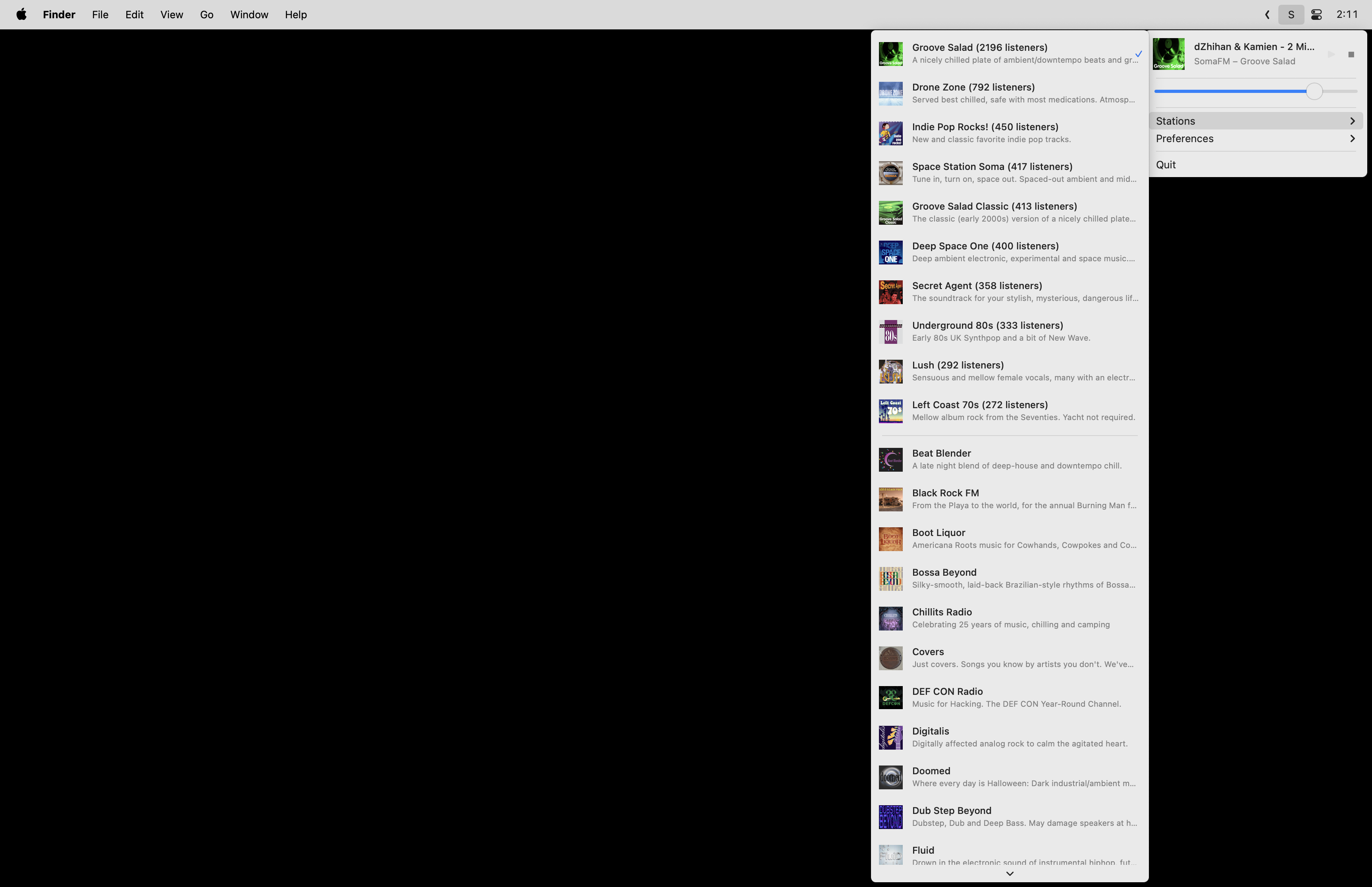
<p>So I built <a href="https://github.com/retlehs/somafm-macos-player">SomaFM Player</a>, a native macOS menu bar app that gives you quick access to every SomaFM station from your status bar.</p>

<p><img src="/img/somafm-macos-player.png" alt="SomaFM Player screenshot" /></p>

<h2 id="features">Features</h2>

<ul>
  <li><strong>All 30+ SomaFM stations</strong> — top 10 by listener count first, then the rest alphabetically</li>
  <li><strong>Live track updates</strong> — see what’s currently playing, updated every 10 seconds</li>
  <li><strong>Media key support</strong> — play/pause with your keyboard media keys</li>
  <li><strong>Independent volume control</strong> — adjust the app volume without changing system volume</li>
  <li><strong>Clickable track titles</strong> — click to search for the current song</li>
  <li><strong>Auto-play on launch</strong> — picks up where you left off</li>
  <li><strong>Dark mode support</strong> — looks right on any macOS appearance</li>
  <li><strong>Lightweight</strong> — lives in the menu bar, never touches the dock</li>
</ul>

<h2 id="install">Install</h2>

<p><strong>Homebrew:</strong></p>

<div class="language-bash highlighter-rouge"><div class="highlight"><pre class="highlight"><code>brew tap retlehs/tap
brew <span class="nb">install</span> <span class="nt">--cask</span> somafm-player
</code></pre></div></div>

<p>Or download the latest release directly from <a href="https://github.com/retlehs/somafm-macos-player/releases">GitHub Releases</a>.</p>

<h2 id="how-its-built">How it’s built</h2>

<p>The app is written in Swift using native Cocoa — no Electron, no SwiftUI, just <code class="language-plaintext highlighter-rouge">NSStatusBar</code>, <code class="language-plaintext highlighter-rouge">NSMenu</code>, and <code class="language-plaintext highlighter-rouge">AVPlayer</code>. It has zero external dependencies.</p>

<p><strong>Architecture.</strong> The app follows MVVM with protocol-based dependency injection. A <code class="language-plaintext highlighter-rouge">SomaFMService</code> fetches channel data from SomaFM’s JSON API, an <code class="language-plaintext highlighter-rouge">AudioPlayer</code> wraps <code class="language-plaintext highlighter-rouge">AVPlayer</code> for streaming, and a <code class="language-plaintext highlighter-rouge">StatusBarViewModel</code> ties everything together with Combine. All UI updates flow reactively through <code class="language-plaintext highlighter-rouge">@Published</code> properties.</p>

<p><strong>Streaming.</strong> The app selects the highest quality playlist available from the SomaFM API and streams it through <code class="language-plaintext highlighter-rouge">AVPlayer</code>. It handles audio device changes gracefully — switch your headphones and playback continues.</p>

<p><strong>Resilience.</strong> Network requests use exponential backoff with jitter (1s, 2s, 4s, up to 8s) and retry up to 3 times. The app differentiates between retryable errors like network failures and non-retryable ones like bad URLs, so it doesn’t waste time retrying things that will never work.</p>

<p><strong>Image caching.</strong> Station artwork is cached in memory with a 100-image, 50MB limit. Images are resized to display size on download to keep memory usage low. Concurrent requests for the same image are coalesced so you don’t end up with duplicate downloads.</p>

<p><strong>Persistence.</strong> A custom <code class="language-plaintext highlighter-rouge">@UserDefault</code> property wrapper stores volume, auto-play preference, and last played channel in <code class="language-plaintext highlighter-rouge">UserDefaults</code> — simple and reliable.</p>

<p>The entire app is about 1,800 lines of Swift. The build and release pipeline uses GitHub Actions for testing, code signing, notarization, and automatic Homebrew cask updates on new tags.</p>]]></content><author><name></name></author><summary type="html"><![CDATA[A lightweight, native macOS menu bar app for streaming SomaFM's 30+ underground and alternative radio stations.]]></summary><media:thumbnail xmlns:media="http://search.yahoo.com/mrss/" url="https://benword.com/img/social-somafm-macos-player.png" /><media:content medium="image" url="https://benword.com/img/social-somafm-macos-player.png" xmlns:media="http://search.yahoo.com/mrss/" /></entry><entry><title type="html">gh-actions: Keep Agents from Writing Outdated GitHub Actions Workflows</title><link href="https://benword.com/gh-actions-keep-agents-from-writing-outdated-github-actions-workflows" rel="alternate" type="text/html" title="gh-actions: Keep Agents from Writing Outdated GitHub Actions Workflows" /><published>2026-04-04T00:00:00+00:00</published><updated>2026-04-04T00:00:00+00:00</updated><id>https://benword.com/gh-actions-keep-agents-from-writing-outdated-github-actions-workflows</id><content type="html" xml:base="https://benword.com/gh-actions-keep-agents-from-writing-outdated-github-actions-workflows"><![CDATA[<p>Every time I ask an AI coding agent to write a GitHub Actions workflow, it reaches for old versions of <code class="language-plaintext highlighter-rouge">actions/checkout</code>, etc., that haven’t been current for a while. It also tends to skip <code class="language-plaintext highlighter-rouge">permissions</code>, ignore built-in caching, and miss basics like <code class="language-plaintext highlighter-rouge">timeout-minutes</code> and <code class="language-plaintext highlighter-rouge">concurrency</code>.</p>

<p>I built <a href="https://github.com/retlehs/gh-actions">gh-actions</a>, an <a href="https://skills.sh">agent skill</a> that teaches your agent GitHub Actions best practices so you don’t have to fix the same things every time.</p>

<h2 id="what-it-does">What it does</h2>

<ul>
  <li><strong>Version lookup at runtime</strong> — instead of hardcoding versions that go stale, the skill tells agents to check <code class="language-plaintext highlighter-rouge">gh api repos/{owner}/{action}/releases/latest</code> before writing a workflow</li>
  <li><strong>Security</strong> — least-privilege <code class="language-plaintext highlighter-rouge">permissions</code>, expression injection prevention, fork/secret safety, and SHA pinning for third-party actions (with <a href="https://github.com/suzuki-shunsuke/pinact">pinact</a> for automation)</li>
  <li><strong>Caching</strong> — prefer the built-in <code class="language-plaintext highlighter-rouge">cache</code> input on setup actions over separate <code class="language-plaintext highlighter-rouge">actions/cache</code> steps</li>
  <li><strong>Common patterns</strong> — concurrency groups, matrix strategies, reusable workflows, path filtering, and <code class="language-plaintext highlighter-rouge">timeout-minutes</code></li>
</ul>

<h2 id="why-bother">Why bother</h2>

<p>LLMs are trained on a snapshot of the internet. GitHub Actions moves fast — major versions bump, best practices shift, and new features like built-in caching get added. The skill fills the gap between what the model learned and what’s current.</p>

<p>The version lookup approach is the key part. Instead of maintaining a static list that rots, the skill teaches the agent <em>how</em> to check — so it stays current without any maintenance.</p>

<h2 id="install">Install</h2>

<div class="language-bash highlighter-rouge"><div class="highlight"><pre class="highlight"><code>npx skills add retlehs/gh-actions
</code></pre></div></div>

<p>Works with Claude Code, Cursor, Codex, and <a href="https://github.com/vercel-labs/skills#supported-agents">30+ other agents</a>.</p>

<hr />

<p>Also check out <a href="/gh-fetch-stop-agents-from-web-fetching-github-urls">gh-fetch</a> — a skill that tells agents to use the <code class="language-plaintext highlighter-rouge">gh</code> CLI instead of web fetching when you share GitHub URLs.</p>]]></content><author><name></name></author><summary type="html"><![CDATA[An agent skill that teaches AI coding agents GitHub Actions best practices — current action versions, security, caching, and common patterns.]]></summary><media:thumbnail xmlns:media="http://search.yahoo.com/mrss/" url="https://benword.com/img/social-gh-actions-keep-agents-from-writing-outdated-github-actions-workflows.png" /><media:content medium="image" url="https://benword.com/img/social-gh-actions-keep-agents-from-writing-outdated-github-actions-workflows.png" xmlns:media="http://search.yahoo.com/mrss/" /></entry><entry><title type="html">Ghostty’s Quake-like Console</title><link href="https://benword.com/ghosttys-quake-like-console" rel="alternate" type="text/html" title="Ghostty’s Quake-like Console" /><published>2026-03-29T00:00:00+00:00</published><updated>2026-03-29T00:00:00+00:00</updated><id>https://benword.com/ghosttys-quake-like-console</id><content type="html" xml:base="https://benword.com/ghosttys-quake-like-console"><![CDATA[<p>One of my favorite <a href="https://ghostty.org/">Ghostty</a> features is the quick terminal — a Quake-style
drop-down console that slides in from the top of the screen on demand.</p>

<video src="/videos/ghostty-quick-terminal.webm" autoplay="" loop="" muted="" playsinline="" controls=""></video>

<p>To enable it, add this to your Ghostty config:</p>

<div class="language-plaintext highlighter-rouge"><div class="highlight"><pre class="highlight"><code>keybind = global:cmd+grave_accent=toggle_quick_terminal
quick-terminal-size = 65%
</code></pre></div></div>

<p>Press <code class="language-plaintext highlighter-rouge">cmd + `</code> to toggle it open and closed. The session persists
between toggles.</p>

<p>Full docs: <a href="https://ghostty.org/docs/config/keybind/reference#toggle_quick_terminal">toggle_quick_terminal</a></p>

<p>(The ANSI art in the video is from <a href="https://github.com/retlehs/ansimotd">ansimotd</a>, a CLI that displays a random piece of ANSI art when you open a terminal. <a href="/ansimotd-retro-ansi-art-for-your-terminal">Read more about it here</a>.)</p>]]></content><author><name></name></author><summary type="html"><![CDATA[Ghostty's quick terminal is a Quake-style drop-down console that slides in from the top of the screen on demand.]]></summary><media:thumbnail xmlns:media="http://search.yahoo.com/mrss/" url="https://benword.com/img/social-ghosttys-quake-like-console.png" /><media:content medium="image" url="https://benword.com/img/social-ghosttys-quake-like-console.png" xmlns:media="http://search.yahoo.com/mrss/" /></entry><entry><title type="html">How Roots Got the @roots Name on GitHub</title><link href="https://benword.com/how-roots-got-the-roots-name-on-github" rel="alternate" type="text/html" title="How Roots Got the @roots Name on GitHub" /><published>2026-03-22T00:00:00+00:00</published><updated>2026-03-22T00:00:00+00:00</updated><id>https://benword.com/how-roots-got-the-roots-name-on-github</id><content type="html" xml:base="https://benword.com/how-roots-got-the-roots-name-on-github"><![CDATA[<p>Occasionally I still think about this old interaction and finally wanted to write about it.</p>

<p>I released Roots in 2011 as a WordPress starter theme. The starter theme eventually got renamed to <a href="https://roots.io/sage/">Sage</a>, and “Roots” became the name for the full ecosystem:</p>

<ul>
  <li><strong>2011</strong> — <a href="https://roots.io/sage/">Sage</a> (originally “Roots”), a WordPress starter theme</li>
  <li><strong>2013</strong> — <a href="https://roots.io/bedrock/">Bedrock</a>, a WordPress boilerplate with modern dependency management</li>
  <li><strong>2014</strong> — <a href="https://roots.io/trellis/">Trellis</a>, server provisioning and deployment for WordPress</li>
  <li><strong>2017</strong> — <a href="https://roots.io/acorn/">Acorn</a>, a Laravel integration for WordPress plugins and themes</li>
</ul>

<p>In 2013 we were still just a starter theme and didn’t have a GitHub organization, but we already had bigger plans in place. The <code class="language-plaintext highlighter-rouge">@roots</code> username appeared to be unused — it belonged to a guy named Rick. There was another open source project called “roots” too, a static site generator. Their team also wanted the username, and they <a href="https://github.com/jescalan/roots/issues/190">opened an issue</a> to coordinate getting it.</p>

<p>Their approach was to contact GitHub support to invoke the <a href="https://docs.github.com/en/site-policy/other-site-policies/github-username-policy">name squatting policy</a>. I had actually already done this just days before them. GitHub told me the account wasn’t inactive, but they offered to pass along a message to the owner on my behalf. Here’s what I sent on June 24th, 2013:</p>

<blockquote>
  <p>Hey there, I run a project called Roots (github.com/retlehs/roots) and wanted to create a GitHub org to use as an umbrella for related projects. I was wondering if you’d be willing to rename your account so that we could use ‘roots’ as the organization name. If not, no worries, I understand :)</p>
</blockquote>

<p>Meanwhile, the other team was pinging the account owner repeatedly and one collaborator suggested they “just harass them on twitter”. They were also <a href="https://github.com/jescalan/roots/issues/190#issuecomment-20692635">shitting on our project</a>:</p>

<blockquote>
  <p>And yeah, this repo is smaller in terms of stars, but the scope of the project is much larger and encompasses several repos, which is why we want a team to put them all in.</p>
</blockquote>

<blockquote>
  <p>Yeah, I’ve used the roots WordPress starter theme, and I do freelance developing for WordPress themes. Thus, I know exactly what the scope of your project is.</p>
</blockquote>

<p><a href="https://github.com/jescalan/roots/issues/190#issuecomment-20692635">I commented</a> that they had no idea about the scope of our project, and that being dicks about it probably doesn’t help anything.</p>

<p>Rick responded:</p>

<blockquote>
  <p>Finally, Ben, thanks. If you guys simply asked me instead of contacting Github first, spamming me and “being dicks about it”, I would have been more than happy to help.</p>

  <p>I’ll contact Github support and get this sorted. Good luck on the project, perhaps i’ll use it some day :).</p>
</blockquote>

<p>Today the <a href="https://github.com/roots"><code class="language-plaintext highlighter-rouge">@roots</code></a> organization has 40+ active public repos, 30+ packages on Packagist with over 84 million downloads, and more than 28k GitHub stars. Sage is also currently the 45th most starred PHP repository on GitHub.</p>

<p>Thank you again, Rick!</p>]]></content><author><name></name></author><summary type="html"><![CDATA[In 2013, two open source projects wanted the @roots GitHub username. One team tried to pressure the owner into giving it up. We just asked nicely.]]></summary><media:thumbnail xmlns:media="http://search.yahoo.com/mrss/" url="https://benword.com/img/social-how-roots-got-the-roots-name-on-github.png" /><media:content medium="image" url="https://benword.com/img/social-how-roots-got-the-roots-name-on-github.png" xmlns:media="http://search.yahoo.com/mrss/" /></entry><entry><title type="html">WP Packages: A Faster Composer Repository for WordPress</title><link href="https://benword.com/wp-packages-a-faster-composer-repository-for-wordpress" rel="alternate" type="text/html" title="WP Packages: A Faster Composer Repository for WordPress" /><published>2026-03-16T00:00:00+00:00</published><updated>2026-03-16T00:00:00+00:00</updated><id>https://benword.com/wp-packages-a-faster-composer-repository-for-wordpress</id><content type="html" xml:base="https://benword.com/wp-packages-a-faster-composer-repository-for-wordpress"><![CDATA[<p>For over a decade, WPackagist has been the default way to install WordPress plugins and themes with Composer. It worked, but it was slow — and earlier this month it was acquired by WP Engine, a private equity-backed company.</p>

<p>We’ve been building open source WordPress tools at <a href="https://roots.io">Roots</a> since 2011. Our <code class="language-plaintext highlighter-rouge">roots/wordpress</code> Composer package has nearly 20 million downloads, and a large portion of the modern WordPress Composer workflow already runs through Roots tooling. Building a Composer repository felt like a natural next step.</p>

<p>So we built <a href="https://wp-packages.org">WP Packages</a> — an independent, open source Composer repository for WordPress plugins and themes.</p>

<h2 id="why-its-faster">Why it’s faster</h2>

<p>WPackagist uses Composer’s older <code class="language-plaintext highlighter-rouge">provider-includes</code> protocol, which forces Composer to download large index files containing metadata for thousands of packages before it can resolve your dependencies.</p>

<p>WP Packages uses Composer v2’s <code class="language-plaintext highlighter-rouge">metadata-url</code> protocol, which lets Composer fetch metadata for only the packages it needs.</p>

<table>
  <thead>
    <tr>
      <th>Plugins</th>
      <th>WP Packages</th>
      <th>WPackagist</th>
      <th>Speedup</th>
    </tr>
  </thead>
  <tbody>
    <tr>
      <td>10 plugins</td>
      <td>0.7s</td>
      <td>12.3s</td>
      <td>17x faster</td>
    </tr>
    <tr>
      <td>20 plugins</td>
      <td>1.1s</td>
      <td>19.0s</td>
      <td>17x faster</td>
    </tr>
  </tbody>
</table>

<p>Cold resolve, no cache.</p>

<h2 id="what-else-is-different">What else is different</h2>

<ul>
  <li><strong>Update frequency</strong> — packages update every 5 minutes (WPackagist is ~1.5 hours)</li>
  <li><strong>Package metadata</strong> — includes author, description, homepage, and support links (WPackagist has been missing these since <a href="https://github.com/outlandishideas/wpackagist/issues/472">a 2020 feature request</a>)</li>
  <li><strong>Cleaner naming</strong> — <code class="language-plaintext highlighter-rouge">wp-plugin/*</code> and <code class="language-plaintext highlighter-rouge">wp-theme/*</code> instead of <code class="language-plaintext highlighter-rouge">wpackagist-plugin/*</code></li>
  <li><strong>CDN-cached</strong> — metadata is served from Cloudflare R2/CDN</li>
  <li><strong>Fully open source</strong> — the entire project including deployment config is <a href="https://github.com/roots/wp-packages">on GitHub</a></li>
</ul>

<h2 id="switching">Switching</h2>

<p>Replace the WPackagist repository in your <code class="language-plaintext highlighter-rouge">composer.json</code>:</p>

<div class="language-json highlighter-rouge"><div class="highlight"><pre class="highlight"><code><span class="p">{</span><span class="w">
  </span><span class="nl">"repositories"</span><span class="p">:</span><span class="w"> </span><span class="p">[</span><span class="w">
    </span><span class="p">{</span><span class="w">
      </span><span class="nl">"type"</span><span class="p">:</span><span class="w"> </span><span class="s2">"composer"</span><span class="p">,</span><span class="w">
      </span><span class="nl">"url"</span><span class="p">:</span><span class="w"> </span><span class="s2">"https://repo.wp-packages.org"</span><span class="w">
    </span><span class="p">}</span><span class="w">
  </span><span class="p">]</span><span class="w">
</span><span class="p">}</span><span class="w">
</span></code></pre></div></div>

<p>Then update your package names from <code class="language-plaintext highlighter-rouge">wpackagist-plugin/*</code> to <code class="language-plaintext highlighter-rouge">wp-plugin/*</code> and <code class="language-plaintext highlighter-rouge">wpackagist-theme/*</code> to <code class="language-plaintext highlighter-rouge">wp-theme/*</code>. There’s also a migration script in our <a href="https://wp-packages.org/wp-packages-vs-wpackagist">GitHub repo</a> that handles this automatically.</p>

<h2 id="how-its-built">How it’s built</h2>

<p>WP Packages is a single Go binary backed by SQLite. A pipeline runs every 5 minutes that discovers packages from the WordPress.org SVN repository, fetches metadata from the WordPress.org API, and builds Composer metadata files that get deployed to Cloudflare R2.</p>

<p>The project is community-funded through <a href="https://github.com/sponsors/roots">GitHub Sponsors</a>.</p>

<p>Full comparison: <a href="https://wp-packages.org/wp-packages-vs-wpackagist">WP Packages vs WPackagist</a></p>]]></content><author><name></name></author><summary type="html"><![CDATA[We built WP Packages, an independent Composer repository for WordPress plugins and themes with 17x faster dependency resolution than WPackagist.]]></summary><media:thumbnail xmlns:media="http://search.yahoo.com/mrss/" url="https://benword.com/img/social-wp-packages-a-faster-composer-repository-for-wordpress.png" /><media:content medium="image" url="https://benword.com/img/social-wp-packages-a-faster-composer-repository-for-wordpress.png" xmlns:media="http://search.yahoo.com/mrss/" /></entry></feed>